ghis: all the commits, finally in one place
Why I built a tool that turns my whole git history, across every team, host and repository, into one animated story page.
I've been writing code in teams for more than ten years. Different companies, different clients, different git hosts: a self-managed GitLab here, a GitHub organisation there, a handful of repositories that only ever lived on a company server. Hundreds of pull requests, thousands of reviews, and no way to see any of it together.
One evening I got curious. What does all of that actually look like? When do I really write code? Which projects took the most of me? Who have I reviewed the most over the years?
Every profile page I had only showed a slice: one host, one account, usually only the last year, often only the default branch. The rest of my history was scattered across a dozen places that would never talk to each other.
I didn't even check
Honestly, I never looked to see whether something like this already existed. I knew exactly what I wanted to see, and I wanted it to look and work exactly the way I pictured it. So I built it. That's ghis: your git history, told beautifully.
What it does
ghis reads your commits, pull/merge requests and reviews from GitHub, GitLab, Codeberg or any git host, and turns them into an animated story page:
- Every day you showed up. A calendar per year, with your longest and current streaks.
- Momentum and rhythm. Commits month by month, and the hours and weekdays you code.
- Where and what. Repositories and languages, by commits and lines changed.
- Collaboration. Pull/merge requests, time to merge, reviews, and who you review most.
- Highlights. Your biggest commit, your 1,000th, first commits to each repository, anniversaries.
You can filter by year and by repository, and each year is compared with the same days of the year before.
Built for real, messy histories
Eight years of team work is not a tidy dataset, so most of the effort went into counting things properly:
- Commits come from real clones, across all branches, matched by every author email you've ever used. Company laptop, personal email, that one typo in your git config.
- Copies count once. A commit that was rebased, cherry-picked or pushed to a fork is recognised as the same change.
- Co-authored commits count too, so pair programming and suggested changes show up.
- Noise is left out. Lockfiles,
node_modules/,dist/, minified files and snapshots don't inflate your line counts, and huge bulk commits like imports or formatter runs are listed separately instead of dwarfing a year of real work. - Only what it needs is downloaded. ghis fetches the history and only the files your commits touched, then deletes everything when the story is built.
Nothing to install
This was a hard rule from the start. If I needed it on a work laptop, it had to run with what's already there: Python and git. No packages, no build step, no account.
git clone https://github.com/radufarcas10/ghis.git
cd ghis
python3 ghis.py
Your browser opens, ghis looks around your machine for repositories, emails and tokens you already have, and one click later your story is ready. It runs on your computer, and your token and code never leave it. Want to host it for a team instead? There's a Docker image for that.
Safe to share
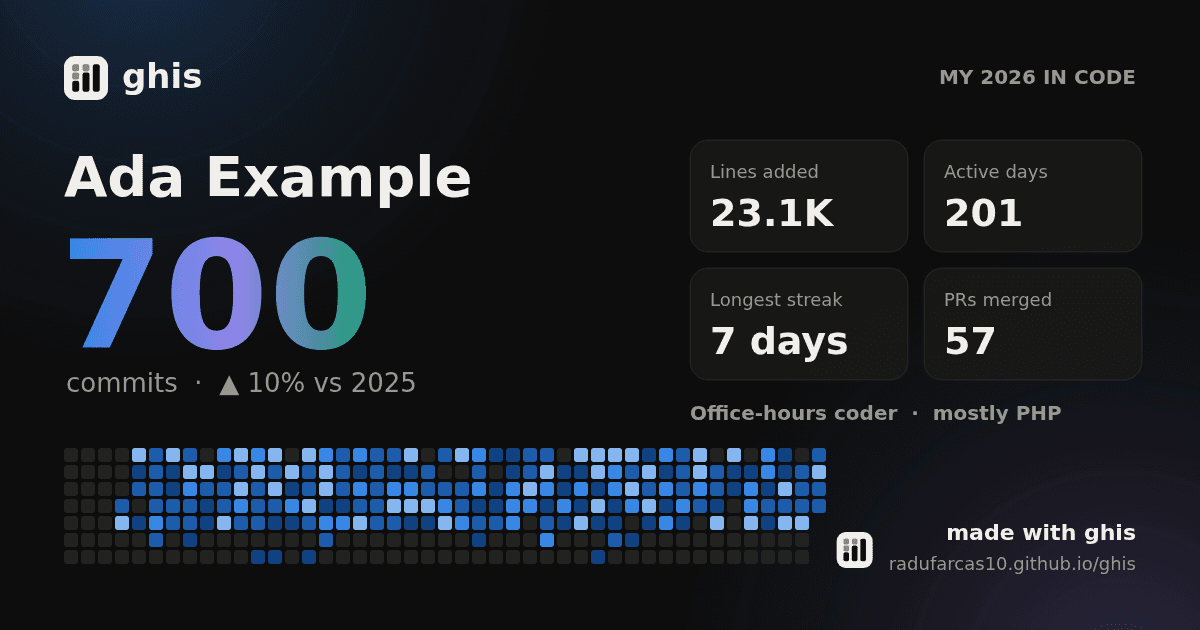
The story page is for you, but sometimes you want to show it off. ghis can download a share card of your highlights, like the one at the top of this post, with no repository names, commit messages or emails on it. Perfect for a year-in-review post without leaking anything from your employer.
Try it
ghis is open source. Run python3 ghis.py demo --open to see a story built from sample
data, or check the live demos first. And if you've
ever wondered what your years of commits look like together, give it a go.